Updated: 16 November 2026 · By Ata Gur
In short. Since 15 September 2026, Spanish mobile operators block SMS, MMS and RCS messages whose sender name (alias) is not listed in the CNMC Alias Registry. To keep sending with your brand name to Spanish numbers, your company has to register the alias at the CNMC’s online office (Sede electrónica) with a digital certificate and say which SMS provider (and, if relevant, which platform as a third party) may use it. Registration is free, takes about 10 minutes and is usually approved within a few days.
At Frizbit we registered our own alias. This guide shows the form as it is today, with a screenshot of each step and the mistakes we ran into. The form is only in Spanish, so we give each field’s Spanish label in bold with its English meaning.
Official links: registration is done at the CNMC Sede electrónica › Gestión del Registro de alias (direct link to the form: tramites.cnmc.gob.es/formulario/213). To check an alias: CNMC public alias look-up. Rules and questions: official CNMC FAQ (PDF, Spanish).
What the CNMC Alias Registry is
An alias (also called an alphanumeric sender ID) is the name shown as the sender of an SMS instead of a phone number, for example “MyShop”. The Alias Registry is the CNMC’s database linking each alias to the company entitled to use it. Spanish operators check it before delivering each message. The CNMC is Spain’s markets and competition regulator, which also oversees telecoms.
Its purpose is to stop smishing: fraudulent SMS that impersonate banks, delivery companies or shops by using their name as the sender.
Since when SMS are blocked, and which rules apply
| Date | What happened |
|---|---|
| 12/02/2025 | Order TDF/149/2025 requires operators to block messages with unregistered aliases. |
| 27/03/2026 | The CNMC approves Circular 1/2026 and creates the Alias Registry. |
| 05/06/2026 | The CNMC amends the circular (representation, bulk uploads). Order TDF/558/2026 postpones blocking to 15 September. |
| 12/09/2026 | Circular 3/2026 is published in the BOE (Spain’s official gazette): a transition period of up to 3 months for aliases requested before 14 September. |
| 15/09/2026 | Blocking fully in force. |
The registry stays open after 15 September, but a new alias cannot be used until its registration takes effect. As of 10 September 2026 there were 13,565 registered aliases and about 6,000 pending requests, according to CNMC sources.
Does it affect you? Which SMS are blocked and which are not
An SMS, MMS or RCS sent to a Spanish number is blocked when:
- the alias is not in the Registry; or
- the alias is registered, but the message comes through a provider that is not registered with the CNMC or that the alias holder has not authorised.
SMS sent from a phone number are not blocked. If your alias is not registered yet, your messages can still go out, but with a number as the sender.
It applies to any company sending SMS with an alias to Spanish numbers, wherever the company is based. For an online shop, that covers messages such as “MyShop: your order has shipped”, abandoned-cart reminders, verification codes and coupons. A brand’s SMS arriving from an unknown number earns less trust and fewer clicks.
Holder, provider and third party: who is who
| Role (Spanish term) | Who it is | Example |
|---|---|---|
| Holder (titular) | The company that owns the alias. It registers or approves it. | Your online shop |
| Originating provider (proveedor de origen, PRO) | The CNMC-registered messaging operator that puts your SMS on the network. Each alias needs at least one. | Vonage, Infobip, LINK Mobility… |
| Third party (tercero) | The entity that manages sending on the holder’s behalf, even if it doesn’t deliver the messages technically. | Your marketing platform (for example, Frizbit) or your agency |
If you send SMS from a platform, ask it which provider to choose and whether to add the platform as a third party. If the provider you pick is not registered, your SMS will be blocked anyway.
Three ways to register your alias
| Option | Who files it | What you need | Typical time |
|---|---|---|---|
| 1. Yourself (recommended) | Your company, at the CNMC Sede electrónica | A Spanish-valid digital certificate for your company’s representative | ~3 business days |
| 2. Your platform or provider files, you approve | The platform (as third party) or the provider, on your behalf | Company name, tax ID and your legal representative’s details (name, ID number, email) | ~4–5 business days |
| 3. With a letter of authorisation | The platform or provider, end to end | A letter of authorisation signed by your company | Depends on when the letter is signed |
In option 2, the CNMC emails your representative to confirm the request. It doesn’t move forward until they accept, which usually adds a day or two. Option 2 or 3 is usually the practical route for companies outside Spain without a Spanish-valid certificate.
How long it takes: from request to your first branded SMS
- You file the request: about 10 minutes.
- The CNMC approves it: usually within 1-3 business days, based on the experience of our providers. The official maximum is 1 month; if the CNMC doesn’t answer in that time, the request is deemed rejected.
- The CNMC publishes the alias in its registry: up to about 24 more hours.
- Your provider activates the alias and your SMS start going out with your brand.
About three days in total if you file it yourself. It is free: the CNMC charges no fee to register or keep an alias.
Alias requirements: format, names and proof of ownership
The CNMC only registers aliases that meet the format in Annex III of Circular 1/2026 and have a clear link to your company.
| Rule (SMS/MMS) | Detail |
|---|---|
| Length | 3 to 11 characters |
| Allowed | Letters a–z and A–Z (including ñ and ç), digits, space and @ & - _ . + |
| Not allowed | Accented letters, leading or trailing spaces, double spaces and symbols such as ! ? # % ( ) * , / : ; < > = € |
| Digits only | Not accepted |
| Upper and lower case | They count: “Brand”, “BRAND” and “brand” are three different aliases |
Names that get rejected: generic words (“Bank”, “Urgent”, “Flight”), names of people or places not linked to the company (“AytoMadrid” yes, “Madrid” no), abbreviations without context, aliases that could mislead or impersonate, and offensive terms.
Proof of ownership (vinculación legítima): a registered trademark (Spanish OEPM or EU EUIPO), a trade name (OEPM), an internet domain, the company name or another public register. Only if you have none of these, “legitimate and habitual use”. You don’t upload documents when registering, but the CNMC can ask for them at any time. If two companies request the same alias, the trademark or trade name wins, then the domain, then the company name.
First: is your alias already registered?
Many aliases were registered in 2026 through bulk uploads by SMS providers. Search for yours first in the CNMC public look-up:
| What you see | What to do |
|---|---|
| It isn’t listed | Register it following this guide |
| It’s listed under your company | Don’t register it again: just add the provider and the platform (third party) you’ll use |
| You received a CNMC email asking you to authorise it | Log in to the Sede and choose “Autorización de alias” within 10 working days |
| It’s listed under another company | An alias has only one holder: choose another or claim it if your link to the name is stronger |
Before you start: what you need
- A digital certificate for your company’s representative (for example, from the FNMT) installed in your browser, or access with Cl@ve. It must be valid in Spain.
- The exact alias. 3 to 11 characters: letters (including ñ and ç), digits, space and a few symbols (@ & _ . +). It can’t be digits only or a generic word like “Bank” or “Urgent”. Case matters: “MyShop” and “MYSHOP” are two different aliases.
- Proof that the alias is yours: a registered trademark (OEPM or EUIPO), trade name, company name or web domain.
- A representative with an email address, who will receive the CNMC’s notifications.
- Your SMS provider’s name and, if you use a platform, its details as a third party (company name and tax ID).
Step by step: how to register your alias at the CNMC
1. Open the procedure with your certificate
Open Gestión del Registro de alias at the CNMC Sede electrónica and click Acceso con certificado electrónico (access with digital certificate).
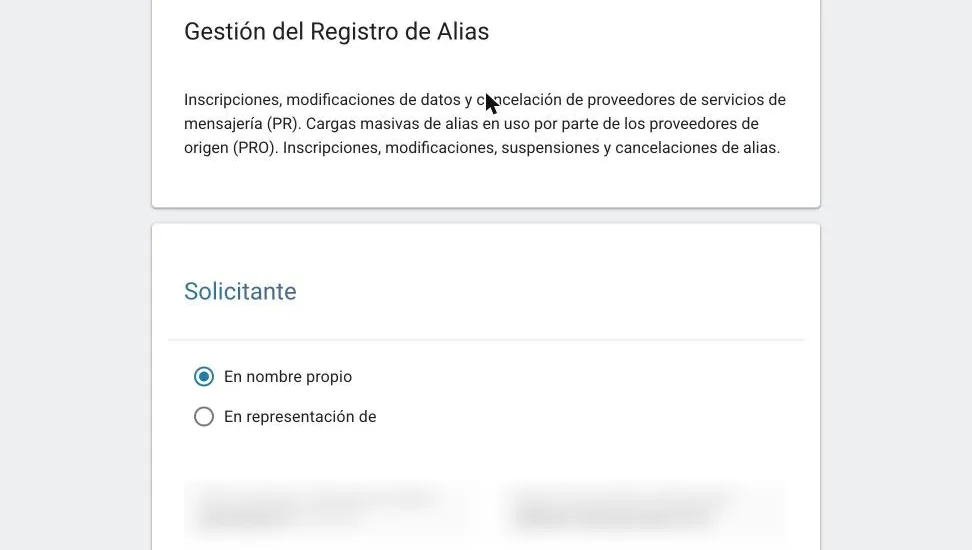
2. Applicant: “En nombre propio”
With your company’s certificate, leave En nombre propio (on your own behalf) selected: the company and signatory details fill in automatically. Add an email and, optionally, a phone number.
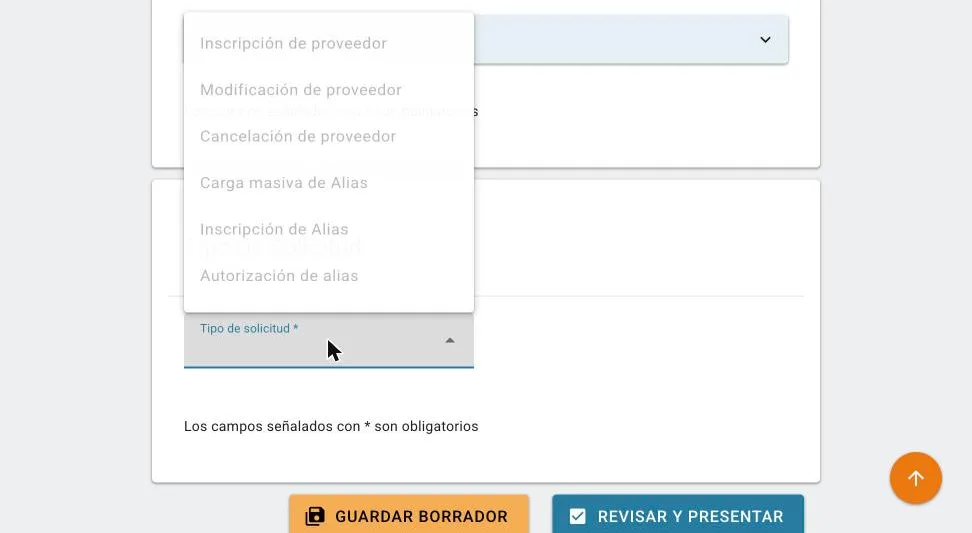
3. Request type: “Inscripción de Alias”
Choose Inscripción de Alias (alias registration). The CNMC shows your company as the holder: check it’s correct. From here on, the postal address (Dirección postal) is mandatory.
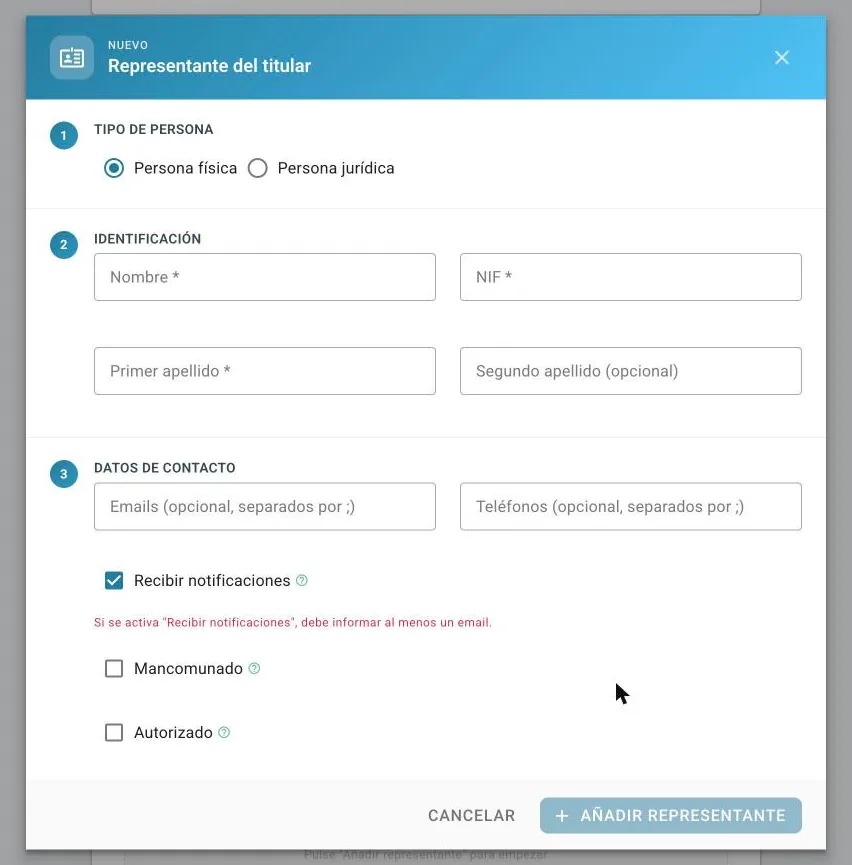
4. Holder’s representative (mandatory)
Click Añadir representante (add representative), choose Persona física (individual) and enter first name, surnames, ID number (NIF) and an email. Leave Recibir notificaciones (receive notifications) ticked; leave Mancomunado (joint) and Autorizado (authorised) unticked unless they apply to you.
5. Add the alias
Under Alias, click Añadir alias (add alias): type the name exactly as it should appear on the phone, choose SMS/MMS and the fecha de activación (activation date, usually today). You can add several aliases in the same request.
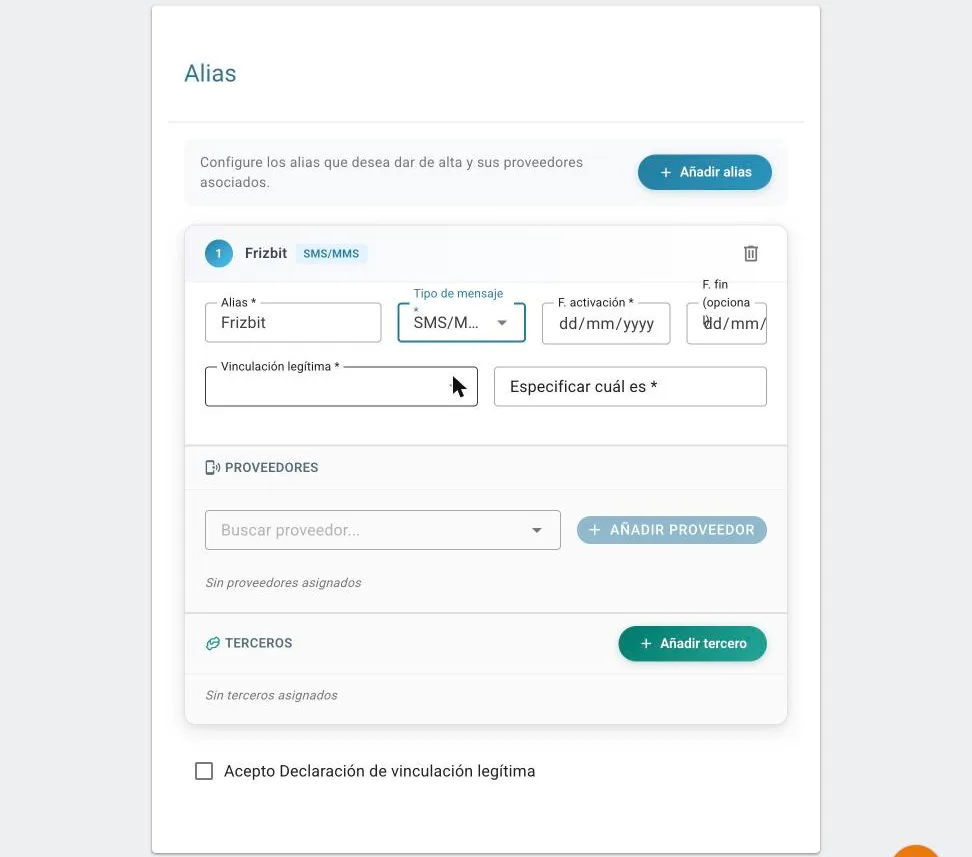
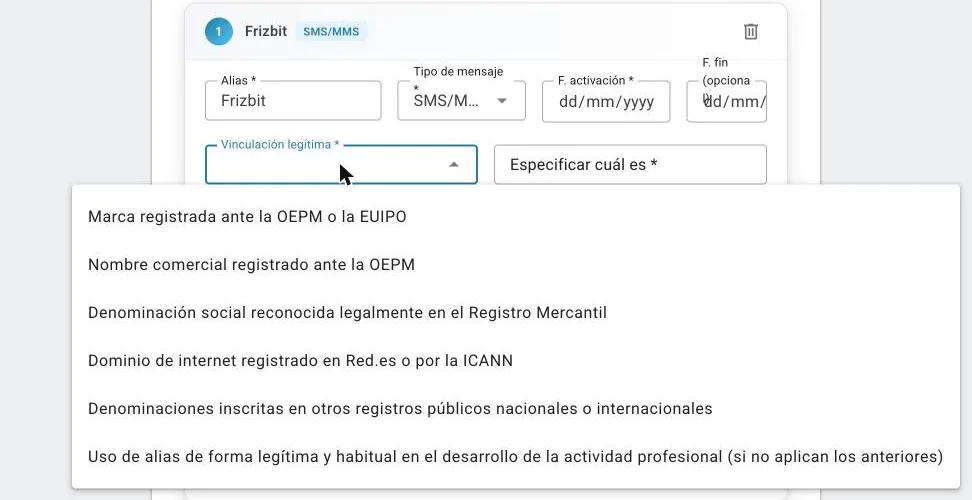
6. Prove the alias is yours (vinculación legítima)
For an online shop, in this order:
- Marca registrada ante la OEPM o la EUIPO (registered trademark), with its number (for example, “Marca UE (EUIPO) nº 0XXXXXXXX”). You can look it up in the OEPM trademark locator or EUIPO eSearch plus.
- If you have no trademark: Dominio de internet (internet domain), with your shop’s domain.
- If the alias matches your company name: Denominación social (company name).
Avoid “Uso de alias de forma legítima y habitual” (legitimate and habitual use) unless you have none of the above.
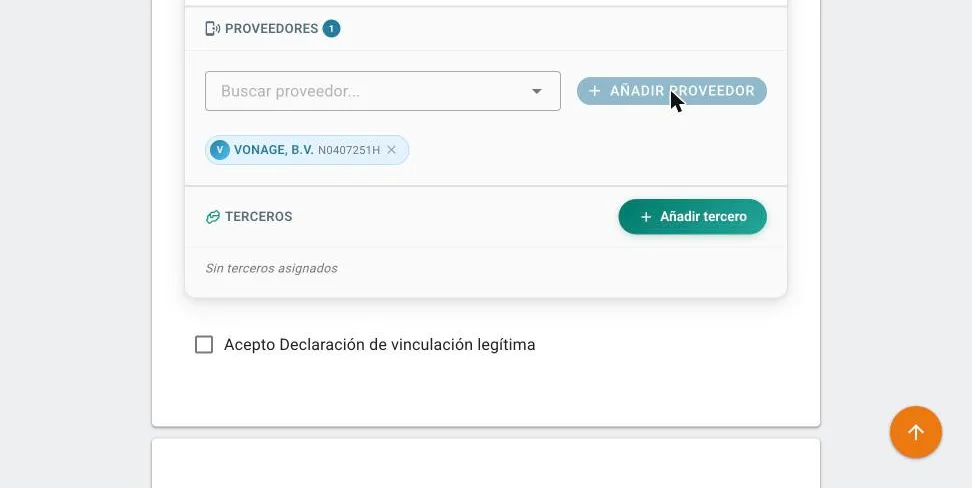
7. Choose the SMS provider
Under Proveedores (providers), search for your provider and click Añadir proveedor (add provider). Our screenshots show VONAGE, B.V., but you should pick the one your platform uses.
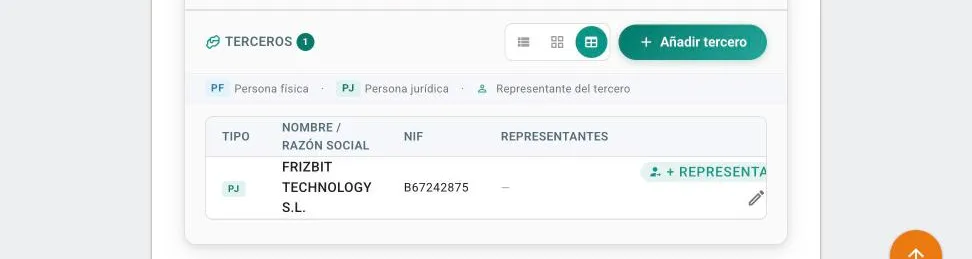
8. Add your platform as a third party
Under Terceros (third parties), click Añadir tercero (add third party), choose Persona jurídica (legal entity) and enter the company name and tax ID. If you send SMS with Frizbit: FRIZBIT TECHNOLOGY S.L. · B67242875. The third party’s representative is optional.
9. Accept the declaration, review and submit
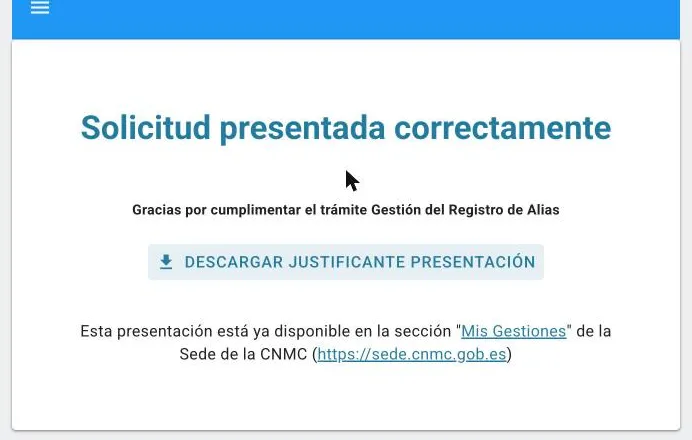
Tick Acepto Declaración de vinculación legítima (I accept the declaration of legitimate link) and click Revisar y presentar (review and submit). In the preview, tick the consent box, click Presentar (submit) and confirm with Aceptar. Download the receipt (justificante): the provider does appear on it.
Common mistakes (and how to avoid them)
- “El campo Representantes del titular exige que haya un mínimo de 1 elemento/s” (the holder’s representatives field needs at least 1 entry). Even if you log in with your certificate, you must add at least one representative with an email.
- “I can’t see the provider in the preview”. That’s normal: the preview doesn’t show providers or third parties. They’re still on the alias card (click Volver, back) and they appear on the receipt.
- Registering only one spelling. If you send as “MyShop” and as “MYSHOP”, register both.
- Choosing an unregistered provider. The message will be blocked even though the alias is registered.
- Ignoring the CNMC’s notifications. The CNMC has asked companies to answer its messages; without a reply in time, the request is rejected.
- Choosing the weakest proof when you have a trademark or domain.
How to check whether an alias is registered
The CNMC has a free public search at numeracionyoperadores.cnmc.es/alias. Type the alias exactly as it appears on the phone (upper and lower case) to see whether it’s registered, which company holds it and since when. The status “En tramitación” means the CNMC is still reviewing it.
Frequently asked questions
How much does it cost to register an alias with the CNMC? Nothing. The CNMC charges no fee to register or keep it.
How long does the CNMC take to approve an alias? Usually 1-3 business days; with publication and provider activation, about three days. The official maximum is one month.
Can I send SMS while my alias is being approved? Yes, but from a phone number instead of your brand name.
What happens if I don’t register my alias? SMS with your name as the sender are blocked. You can only send from a number.
Can I change SMS provider later? Yes. From the same Sede you can add, change or remove providers and third parties without registering the alias again.
Can I cancel the alias? Yes, at any time and with immediate effect. An alias that isn’t used for 12 months in a row is suspended automatically.
Does the same registration cover RCS? No. RCS is registered as a separate alias, with message type “RCS”.
Does it affect companies outside Spain? Yes: it applies to any company sending SMS with an alias to Spanish numbers.
Does upper and lower case matter? Yes. For the CNMC, “MyShop” and “MYSHOP” are different aliases: register exactly the spelling you use.
My previous SMS provider already registered my alias. Do I need to do it again? No. Just add the new provider (and the platform as a third party) to that alias. An alias can have several providers.
Which certificate do I need? A digital certificate valid in Spain; the most practical is the FNMT certificate for a legal entity’s representative. If nobody at your company has one, you can authorise a representative with a signed letter.
Who do I ask if the Sede shows an error? CNMC support at [email protected], with a screenshot of the error. Questions about the rules go to [email protected].
How Frizbit helps
Frizbit sends automated SMS for abandoned carts, recommendations and alerts for online shops. If you want to send them with your brand name in Spain, we give you the exact details for the form and walk you through it on a call while you file it.
Official sources
- CNMC — Gestión del Registro de alias (Sede electrónica)
- CNMC — Press release: Alias Registry created (27/03/2026)
- CNMC — Press release: circular amended (05/06/2026)
- CNMC — Call to register aliases before 15/09 (01/09/2026)
- BOE — Order TDF/149/2025
- CNMC — Public alias look-up
- CNMC — Alias Registry FAQ (19/06/2026)
- BOE — Circular 1/2026, consolidated version